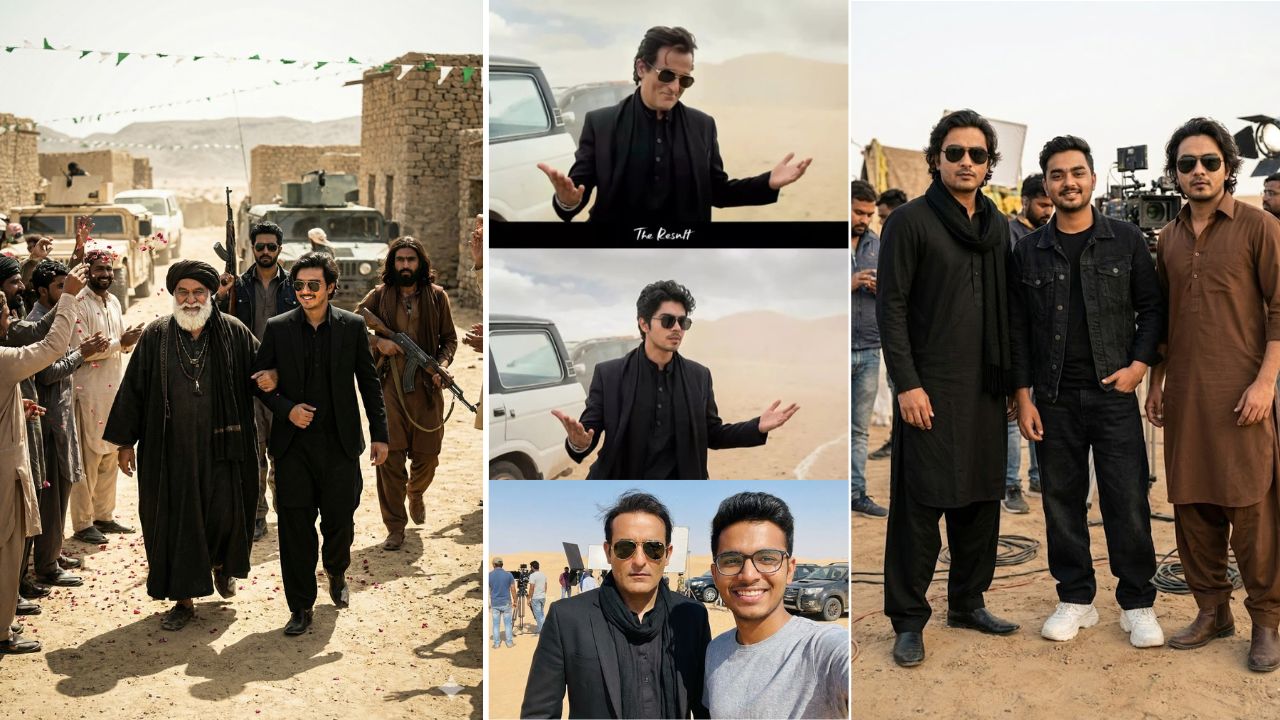
Dhurandhar Photo Editing Prompt: Nowadays, AI photo editing is spreading like wildfire on social media, and one of the biggest reasons behind this trend is Google Gemini. Recently, photos inspired by Akshaye Khanna’s powerful Dhurandhar movie look have gone massively viral. Everyone wants to recreate this bold, cinematic style in their own photos, and the good news is you don’t need professional editing skills for it.
With the help of AI prompts, you can transform an ordinary photo into a movie-style masterpiece within minutes. This Dhurandhar photo editing trend is simple, fast, and gives stunning results. In this post, I’ll explain how this viral editing works and how you can create the same cinematic look step by step using Google Gemini.
Details of Dhurandhar AI Photo Editing Prompt
This viral editing style is inspired by a strong cinematic movie scene. The main reason these photos are getting so much attention is the perfect combination of background, outfit, lighting, and expressions. Every detail is carefully designed to match the intense Dhurandhar theme.
The photo usually features a dark, dramatic color tone that enhances the overall mood. The desert-style background blends naturally with the subject, making the image look like a real movie still. Clothing, posture, and facial expressions are aligned perfectly with the character’s powerful personality. Thanks to AI, your original photo merges smoothly with the cinematic environment without looking artificial.
All these elements together create a realistic, high-quality image that looks straight out of a blockbuster film.
All Akshaye Khanna Dhurandhar Ai Photo Editing Prompts
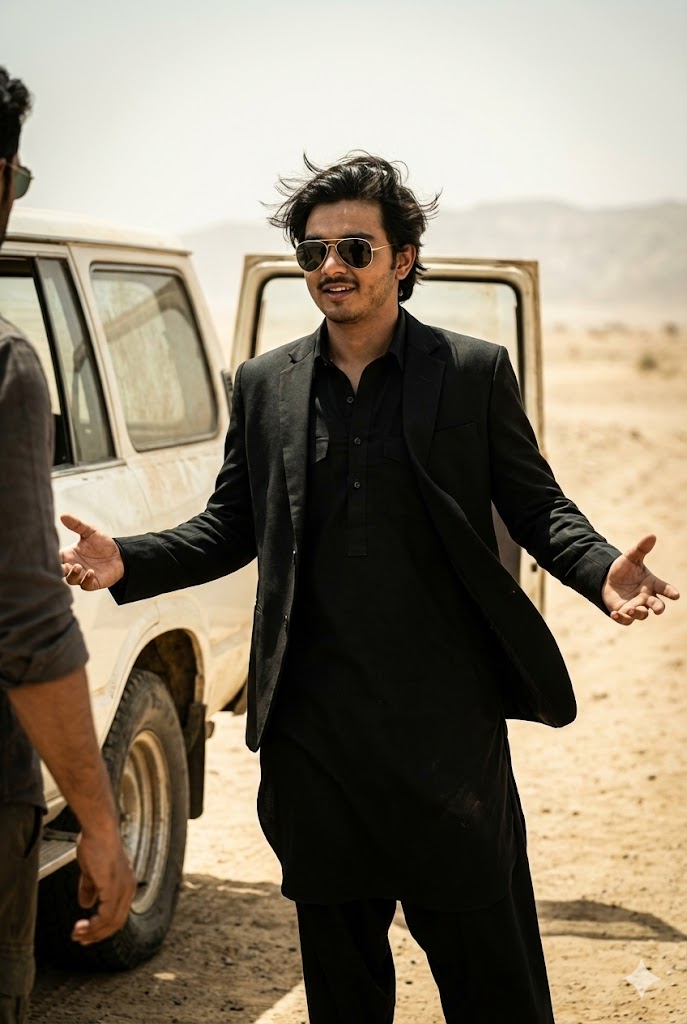
Create a highly realistic, cinematic image of a 17-year-old young man who appears to be an actor, with dark, windswept hair and stylish gold-framed aviator sunglasses. He is dressed entirely in black, wearing a black Pathani suit paired with a black blazer, giving off a sharp, suave, and slightly villainous persona. The young man has a subtle smile or smirk on his face, and his arms are outstretched with palms slightly open, as if he is presenting something, shrugging, or expressing calm confidence or mild exasperation. He appears to be mid-conversation with someone partially visible on the left side of the frame, where only an arm and shoulder can be seen. The scene is set in a vast, open, desolate landscape resembling a dusty sandy plain or desert, with hazy light-brown or tan sand and faint hills in the distance, indicating a dry, arid environment. To the man’s left, a portion of a vintage or older white vehicle—possibly an SUV or truck—is visible with the rear passenger door open, adding to the sense of an action or drama sequence. The overall style should be cinematic, like a high-definition film still, with dramatic lighting despite the bright environment, capturing an intense action-thriller mood. The face must match the reference image with 100% accuracy.
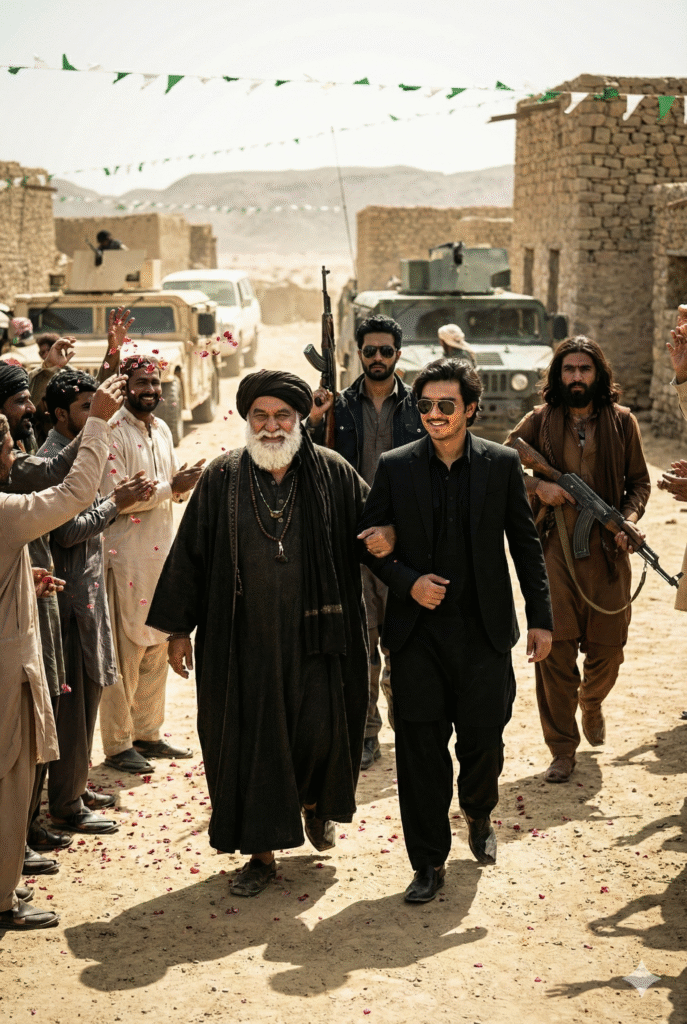
Create a realistic, wide cinematic shot of a group of men walking toward the camera in an outdoor, arid, desert-like environment. In the foreground, two prominent figures lead the scene: on the left, an older man with a long white beard smiles broadly while walking confidently, flanked closely by two younger men. He wears traditional attire including a dark turban, a shawl, and a heavy dark coat or robe, accessorized with dark beaded necklaces and a distinctive teal-blue ring. On the right, a 15-year-old younger, stylish man with messy dark wavy hair wears a completely black suit with a Pathani-style outfit and sunglasses, smiling warmly as he walks arm-in-arm with the older man. Both figures move with clear intent and presence. In the background, three other men follow, holding AK-47 rifles: one in the center wears a dark jacket and sunglasses with visible stubble, while two others walk on the edges, including one on the far right with long hair and a beard dressed in brown attire. They are surrounded by a cheering, excited crowd of villagers, many in traditional clothing, throwing flowers or petals in celebration. Behind them, military or utility vehicles are parked, and simple stone or mud structures line the path. The setting appears dry and mountainous, with dark vehicles visible and thin green and white decorative streamers stretched across the top of the frame. The scene conveys a powerful, dramatic atmosphere, suggesting a triumphant return or significant public gathering, captured in high resolution with subtle film grain, dramatic lighting, and bright, harsh daytime sunlight. Faces should match the reference image with 100% accuracy.
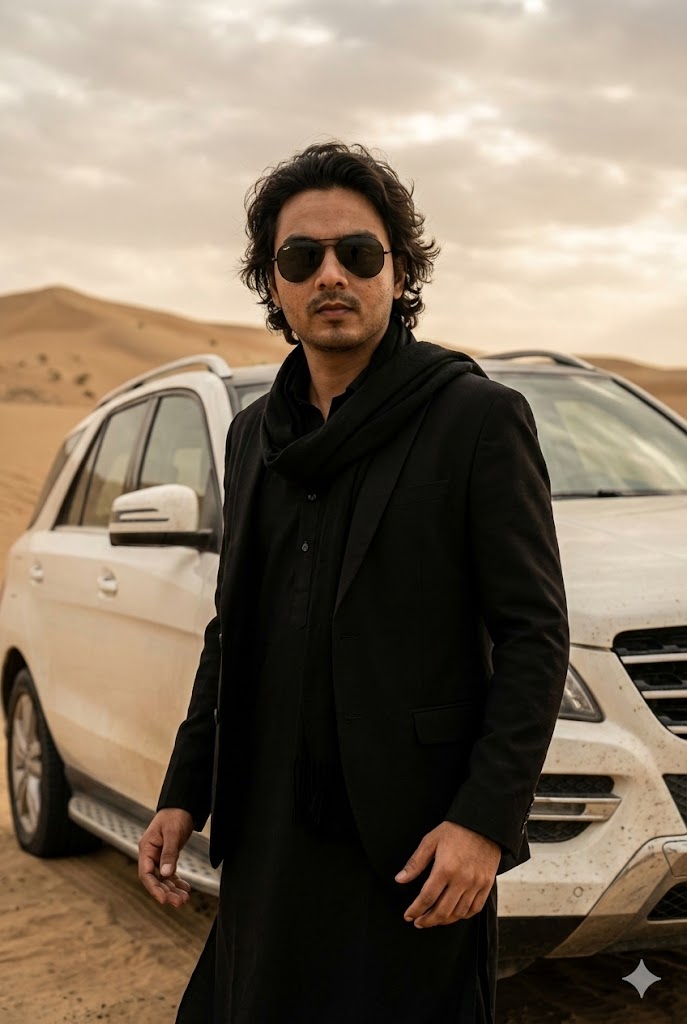
A stylish Indian man standing confidently in a desert landscape, wearing a black kurta with a black blazer and matching scarf, dark aviator sunglasses, medium wavy hair, calm and powerful expression. Hands slightly open in a relaxed yet dominant pose. A luxury white SUV parked behind him at an angle. Dusty environment with soft sand dunes in the background. Cloudy sky with muted beige and warm tones. Cinematic Bollywood movie scene inspired by a serious action-drama character.
Ultra-realistic photography, shallow depth of field, professional cinematic lighting, soft shadows, dramatic mood, 4K ultra-detailed, sharp focus on face, realistic skin texture, movie-grade color grading, high contrast, natural tones, slight film grain.
FACE 100% MATCH AS REFERENCE IMAGE, realistic proportions, no distortion, no blur.
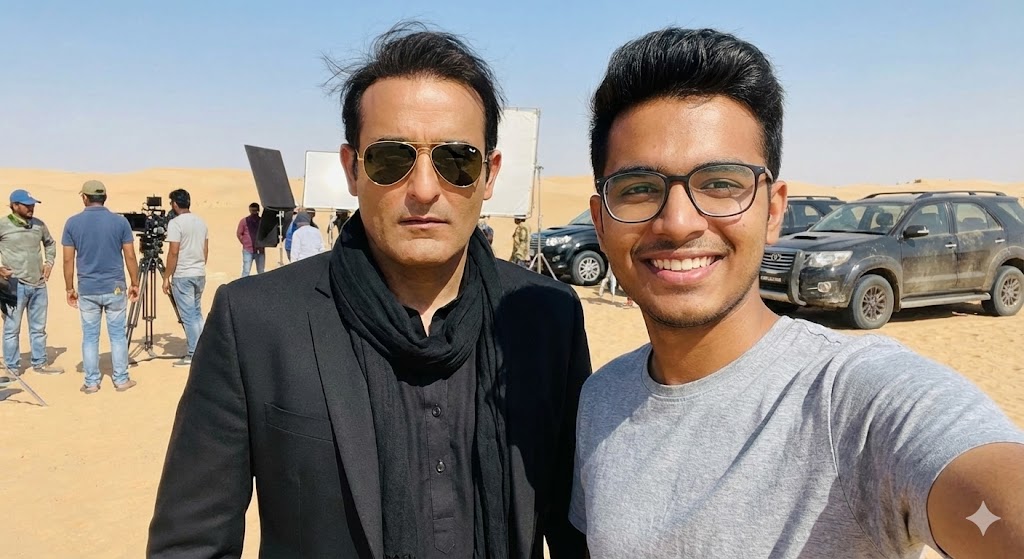
A realistic selfie shot taken by a young man standing next to Bollywood actor Akshaye Khanna in a desert environment. Akshaye Khanna is on the left, looking serious, wearing a black blazer over a black kurta, a black scarf wrapped around his neck, and gold-rimmed aviator sunglasses. He has slightly messy, windblown dark hair. The young man on the right is wearing a grey t-shirt and glasses, smiling at the camera. The background is a behind-the-scenes movie set in a sandy desert, with film crew members, technical equipment, lights, and black SUVs parked in the distance. Bright natural daylight, harsh shadows, 4k resolution, candid smartphone photography style.
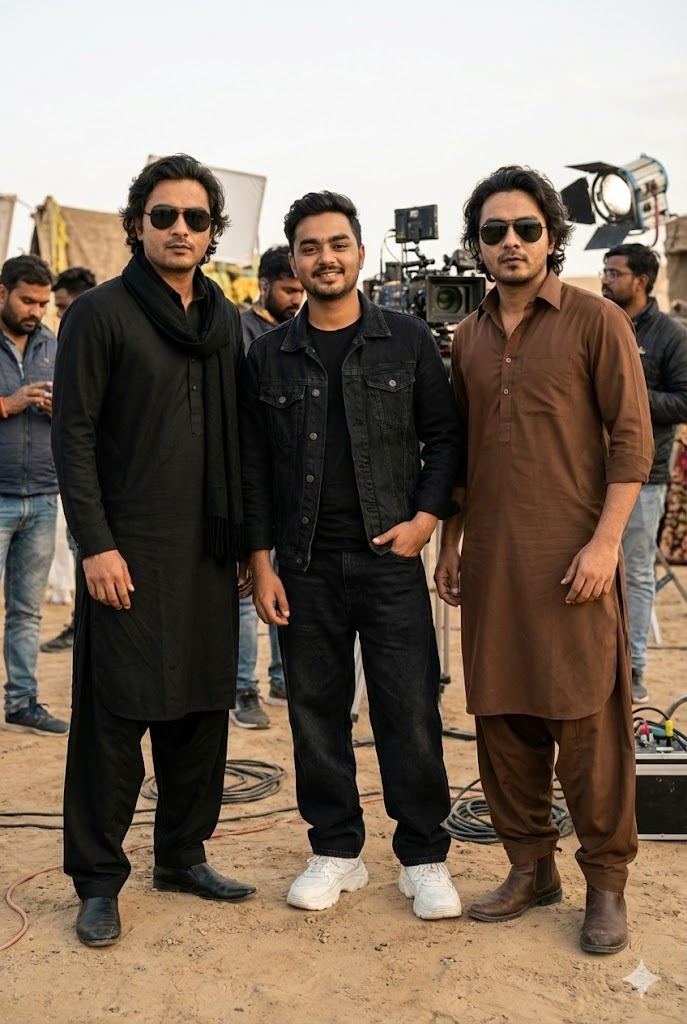
Hyper-realistic 8K natural photography showing a real behind-the-scenes film shoot moment from the movie “Dhurandhar”, captured at an outdoor location in daylight with natural cinematic lighting, realistic shadows, and a shallow depth of field. Three people are standing together naturally in a relaxed composition. In the center is me, with my face matching the reference image exactly, wearing a black denim jacket over a black t-shirt, black baggy jeans, and chunky white sneakers, with a slight smile and a calm, natural pose. On the left stands Actor 1, with his face and hairstyle matching the reference image exactly, dressed in a black kurta, black pajama, black stole/scarf, and a black outer layer, wearing black rectangular sunglasses. On the right stands Actor 2, with his face matching the reference image exactly, featuring the same long hairstyle and beard as the reference, wearing a brown traditional kurta with a brown salwar, brown boots, and black aviator sunglasses. All faces must match their respective reference images perfectly, and all outfits, hairstyles, accessories, and sunglasses must be exactly the same as shown in the references, maintaining a realistic, candid, cinematic atmosphere.
Advantages of Using Google Gemini for Photo Editing
Google Gemini has made AI photo editing extremely simple and effective. Even if you are a beginner, you can get professional-looking results without any complicated tools. Gemini enhances image clarity, sharpness, and color balance automatically.
It smartly manages light and shadows, giving your photo a cinematic and realistic feel. That’s why these images perform so well on platforms like Instagram, Facebook, and YouTube. Many users are now using these edited photos as Reel covers, story posts, thumbnails, and even short videos.
Since this trend is currently viral, using Google Gemini prompts can help you stay ahead and create eye-catching content easily.
How to Use Dhurandhar AI Photo Editing Prompt
Using the Dhurandhar photo editing prompt is very easy. First, choose the prompt that matches your desired style. Once selected, copy the prompt text.
Now, open Google Gemini by searching it online or using a direct link. Paste the copied prompt into the input box. After that, click on the plus (+) icon to upload your photo. You can use any clear image of yourself.
Once everything is set, click on Generate. Within seconds, Google Gemini will create a cinematic Dhurandhar-style photo based on your prompt. Preview the result, and if you’re satisfied, download the image in full HD quality. Reference images are often provided so you can understand the expected outcome.
Conclusion
If you want to give your photos a powerful movie-style transformation, the Dhurandhar photo editing prompt using Google Gemini is a perfect choice. This AI editing method doesn’t just enhance images; it completely changes the vibe and personality of your photo.
The cinematic look, dramatic atmosphere, and realistic effects make it ideal for social media posts. Since this trend is already viral, now is the best time to try it and create stunning edits that stand out. With just a prompt and one photo, you can achieve an impressive Dhurandhar-style AI image effortlessly.